As a beginner woodworker, I’ve found John Heisz’s videos and website to be quite helpful. Here’s his YouTube channel (www.youtube.com/user/jpheisz), and here’s his website (www.ibuildit.ca).
He has an “Easy Angle Cutting Guide” protractor tool that I’m going to make, but rather than mark out the angles by hand, I figured I’d take an online protractor and modify it to my liking. I wanted more detail on my protractor, so I ended up making my own protractor from scratch using LibreOffice‘s Draw program. I thought I’d share the results.
Open it in your photo editor of choice and print it out on an 81/2 x 11 sheet of paper, and it will make a 10″ protractor.
Here it is as a JPG.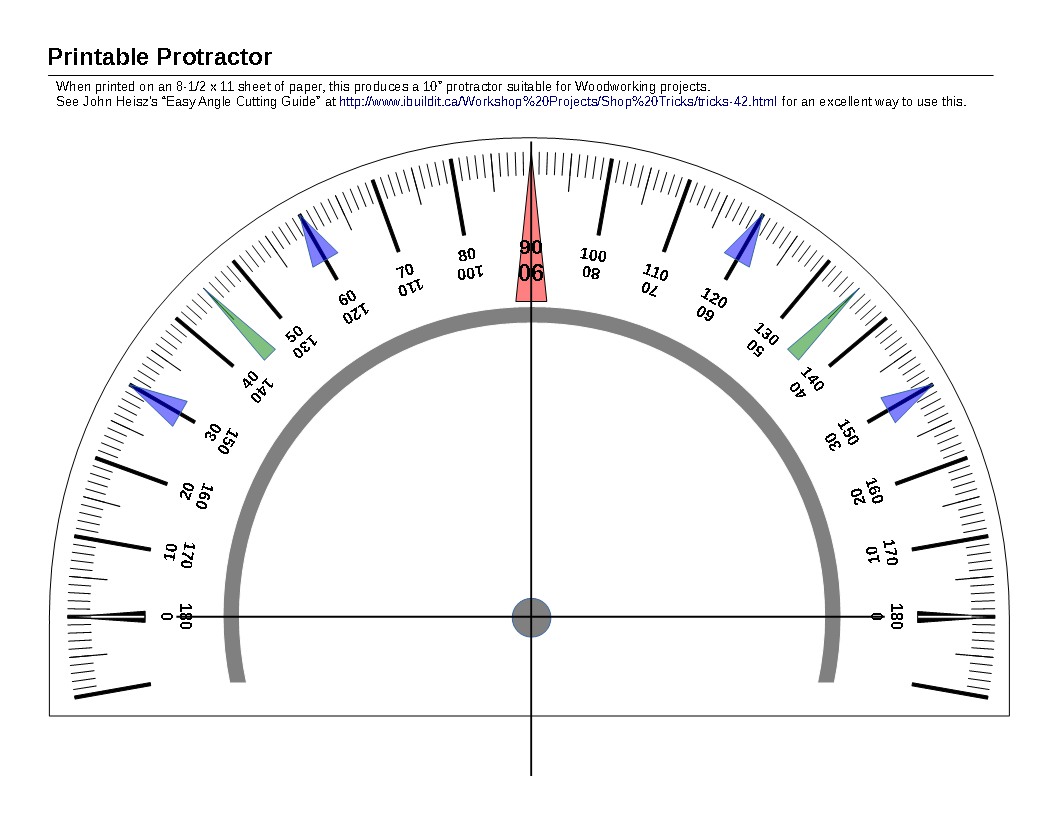
Here it is as a PDF: Protractor (PDF, 35K)
And if you want to edit it using LibreOffice (or OpenOffice), feel free to use this file: Protractor (ODG, 45k)


